
Showing posts with label TTS. Show all posts
Showing posts with label TTS. Show all posts
2011-05-08
The First Men in the Moon as a TTS Application (for PC)
Link to the download of the EXE or ZIP file:
The_First_Men_in_the_Moon.exe
1) Download
2) Run~extract
3) Open "The_First_Men_in_the_Moon" folder
4) Open "1013_pg_etext.hta"
5) Select chapter and press "Play"


2011-05-05
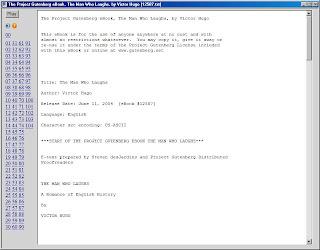
The Man Who Laughs as a TTS Application (for PC)
Link to the download of the EXE or ZIP file:
The_Man_Who_Laughs.exe
1) Download
2) Run~extract
3) Open "The_Man_Who_Laughs" folder
4) Open "12587_pg_etext.hta"
5) Select chapter and press "Play"

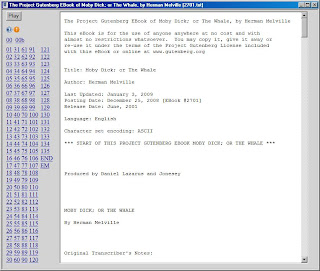
The Whale as a TTS Application (for PC)
Link to the download of the EXE or ZIP file:
The_Whale.exe
1) Download
2) Run~extract
3) Open "The_Whale" folder
4) Open "2701_pg_etext.hta"
5) Select chapter and press "Play"

2011-05-01
Oliver Twist as TTS app (for PC)
Link to the download of the EXE or ZIP file:
olivr10.exe
1) Download
2) Run~extract
3) Open "Oliver_Twist" folder
4) Open "olivr10_pg_etext.hta"
5) Select chapter and press "Play"
 Download:Oliver Twist as TTS app
(Made with my 'make-TTS-Book' utility)
Related link - here's the "Classics Illustrated" found on Scribd:
http://www.scribd.com/doc/24056830/Oliver-Twist-Classics-Illustrated
Download:Oliver Twist as TTS app
(Made with my 'make-TTS-Book' utility)
Related link - here's the "Classics Illustrated" found on Scribd:
http://www.scribd.com/doc/24056830/Oliver-Twist-Classics-Illustrated
 Download:Oliver Twist as TTS app
(Made with my 'make-TTS-Book' utility)
Related link - here's the "Classics Illustrated" found on Scribd:
http://www.scribd.com/doc/24056830/Oliver-Twist-Classics-Illustrated
Download:Oliver Twist as TTS app
(Made with my 'make-TTS-Book' utility)
Related link - here's the "Classics Illustrated" found on Scribd:
http://www.scribd.com/doc/24056830/Oliver-Twist-Classics-Illustrated
2010-12-10
Thinner TTS...

I hop around so many apps -- I thought I'd better come up with a better way to do TTS(at least for me):
If you'd like to try download and try these:
1) Download TTSAnyAppTray_SE.exe to Desktop or Documents folder:
http://►.ttsanyapp.operaunite.com/Downloads/
2) Run TTSAnyAppTray_SE.exe to extract the software
(must be done as Administrator). This creates a folder
called MyItzyBits under same folder as downloaded to in step 1.
3) Double click ..\MyItzyBits\TTSAnyAppTray.exe
4) Highlight some text in most any application
5) Click the '►' icon in your system tray and 'Play' from that
context menu.
Note: If you want to download additional~updated phonetics files -- download to same directory as to which you downloaded software and extracted (step 2)
TTSAnyAppTray.exe has additional options:
ReadBrackets ~ check to read numeric footnote, e.g., [1] - default behavior is to not read these type items.
ReadParens ~ check to read numerics found inside parens, e.g., Robert Louis Stevenson(1850-1898) default behavior is to not read these type items.
Phonetics ~ click to open a window which stores ~ saves a list of phonetics "swaps", for example "WAR I=WAR ONE, etc.
Contains:
ProcessQuit.exe, TTSAnyAppTray.exe, TTSAnyApp.exe

TTSAnyAppTray by Michael T. Bee is licensed under a Creative Commons Attribution 3.0 Unported License.
Based on a work at http://michael-t-bee-esi.blogspot.com.
Permissions beyond the scope of this license may be available at mailto:michael.t.bee@gmail.com.
Of course, a truly thinner TTS would be a Kindle. But, on our budget that may be a while. Meanwhile...
Enhancements:
The phonetics are now "saveable". Try changing "(default)" to a specific name and then pressing OK. If you then click the '...' -- you bring that file up and edit your own set of phonetics. If you want to have multiple copies -- save as a different name.
Screen shot:

2010-04-23
Thinner TTS...

I hop around so many apps -- I thought I'd better come up with a better way to do TTS(at least for me).
Save the download to your desktop-- run to extract -- then drag TTSAnyAppTray.exe to your Quick Launch or simply double-click it. You'll see a system tray '>' play icon that you can then activate for play~speak back of text with SAPI. Then, highlight some text -- right-click the app in the system tray and click 'play' -- to pause~stop right-click and click play again (to uncheck).
TTSAnyAppTray.exe has additional options:
ReadBrackets ~ check to read numeric footnote, e.g., [1] - default behavior is to not read these type items.
ReadParens ~ check to read numerics found inside parens, e.g., Robert Louis Stenvenson(1850-1898) default behavior is to not read these type items.
Phonetics ~ click to open a window which stores ~ saves a list of phonetics "swaps", for example "WAR I=WAR ONE, etc.
Download:
http://►.ttsanyapp.operaunite.com/Downloads/
Contains:
ProcessQuit.exe, TTSAnyAppTray.exe, TTSAnyApp.exe
TTSAnyAppTray by Michael T. Bee is licensed under a Creative Commons Attribution 3.0 Unported License.
Based on a work at http://michaeltbeeitprof.blogspot.com.
Permissions beyond the scope of this license may be available at mailto:michael.t.bee.itprof@gmail.com.
Of course, a truly thinner TTS would be a Kindle. But, on our budget that may be a while. Meanwhile...
Enhancements:
The phonetics are now "saveable". Try changing "(default)" to a specific name and then pressing OK. If you then click the '...' -- you bring that file up and edit your own set of phonetics. If you want to have multiple copies -- save as a different name.
Screen shot:
2009-08-21
PlayTTS from highlighted app text...
For the PC, this is the cleanest ~ quickest TTS(text to speech) option I've come up with.
1) Download and extract the .exe files from this Zip
(to the same folder):
CopyPlayTTS.zip
2) Drag the 'CopyPlayTTS.EXE' to your quick launch.
3) Highlight some text in any (most) applications
Notes:
{Escape} stops the speaking text.
The .exe files are compiled AutoIt scripts.
You can save them anywhere-just as long as
they're in the same folder.
Example use of CopyPlayTTS:
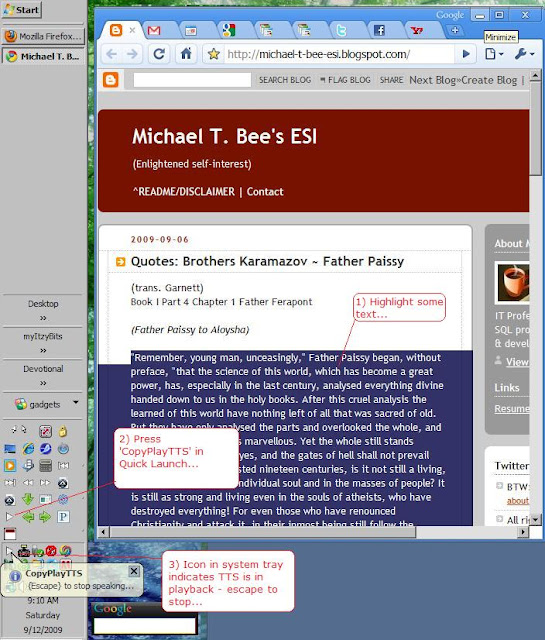
Example use of CopyPlayTTS 2 : CopyPlayTTS makes text file ~ stores in 'My Documents'...

1) Download and extract the .exe files from this Zip
(to the same folder):
CopyPlayTTS.zip
2) Drag the 'CopyPlayTTS.EXE' to your quick launch.
3) Highlight some text in any (most) applications
| 4) Click the |  | button in your quicklaunch |
{Escape} stops the speaking text.
The .exe files are compiled AutoIt scripts.
You can save them anywhere-just as long as
they're in the same folder.
Example use of CopyPlayTTS:
Example use of CopyPlayTTS 2 : CopyPlayTTS makes text file ~ stores in 'My Documents'...

2009-06-27
TMS / Grow in Christlikeness
This app lets you listen to the Topical Memory Verses "Grow in Christlikeness".
TMS_GIC.HTA
You'll need 'Peedy' and other MS-Agent components, and RealPlayer.

TMS_GIC.HTA
You'll need 'Peedy' and other MS-Agent components, and RealPlayer.

2009-06-12
From Alarms and Discursions by G.K. Chesterton
1 Gargoyles ~ III: "Realism is simply Romanticism that has lost its reason."
2 The Surrender of the Cockney ~ "I sincerely maintain that Nature-worship is more morally dangerous than the most vulgar man-worship of the cities; since it can
easily be perverted into the worship of an impersonal mystery, carelessness, or cruelty.
3 The Nightmare ~ ...All really imaginative literature is only the contrast between
the weird curves of Nature and the straightness of the soul.
Man may behold what ugliness he likes if he is sure that he will
not worship it; but there are some so weak that they will
worship a thing only because it is ugly. These must be chained
to the beautiful. It is not always wrong even to go, like Dante,
to the brink of the lowest promontory and look down at hell.
It is when you look up at hell that a serious miscalculation has
probably been made.
~ Google this ~ http://tinyurl.com/mhbhgv
~ download HTA app to listen (save as '.exe' rename from '.exe_'):
http://tinyurl.com/l6zpcw
...you'll need 'Peedy' and other MS-Agent components.
~ bookmark back to here(for Tweets): http://tinyurl.com/nj3aqy
2 The Surrender of the Cockney ~ "I sincerely maintain that Nature-worship is more morally dangerous than the most vulgar man-worship of the cities; since it can
easily be perverted into the worship of an impersonal mystery, carelessness, or cruelty.
3 The Nightmare ~ ...All really imaginative literature is only the contrast between
the weird curves of Nature and the straightness of the soul.
Man may behold what ugliness he likes if he is sure that he will
not worship it; but there are some so weak that they will
worship a thing only because it is ugly. These must be chained
to the beautiful. It is not always wrong even to go, like Dante,
to the brink of the lowest promontory and look down at hell.
It is when you look up at hell that a serious miscalculation has
probably been made.
~ Google this ~ http://tinyurl.com/mhbhgv
~ download HTA app to listen (save as '.exe' rename from '.exe_'):
http://tinyurl.com/l6zpcw
...you'll need 'Peedy' and other MS-Agent components.
~ bookmark back to here(for Tweets): http://tinyurl.com/nj3aqy
2009-03-01
Edgar Rice Burroughs etexts ~ TTS
I've created HTML Applications based on Project Gutenberg etexts of some favorite Edgar Rice Burroughs novels I read when young. His style may be lacking -- but, I value them for their imagination and adventure. In this they still don't disappoint.
To install them - save as '.exe' to your desktop, that is, right-click "save as" but remove the trailing "_" character).
To use -- you'll need to have either MS-Excel or a download of the MS Agent software -- see other topics under 'TTS' label.
A Princess of Mars
At the Earth's Core
Jungle Tales of Tarzan
Tarzan of the Apes
To install them - save as '.exe' to your desktop, that is, right-click "save as" but remove the trailing "_" character).
To use -- you'll need to have either MS-Excel or a download of the MS Agent software -- see other topics under 'TTS' label.
A Princess of Mars
At the Earth's Core
Jungle Tales of Tarzan
Tarzan of the Apes
2009-01-25
TTS.HTA

I love to read(see the link to Project Gutenberg at bottom). I made this app to demonstrate ~ provide an easy way to use the TTS functionality that MS Windows. I use it for emails, online texts, other reading - it has helped me greatly.
Follow the tinyURL to download:
http://tinyurl.com/ajxxed
NOTE: Save (without the trailing "_" char) to your desktop - to use - double-click.
If your browser doesn't let you adjust the name of the download -- you'll have to manually rename it once it get's to your download folder or desktop.
History:
v.14 mtb ~ 05/23/2009 ~ dropped requirement of Excel
v.12 mtb ~ 03/14/2009 ~ went graphical with buttons, allow pass in of command line text to be played (after which it quits), this now works in concert with BrowseThis.HTA (if present)
Google 'Gutenberg':
http://www.google.com/search?hl=en&q=gutenberg&btnG=Google+Search&aq=f&oq=
Google 'Gutenberg':
http://www.google.com/search?hl=en&q=gutenberg&btnG=Google+Search&aq=f&oq=
Download details: Streets and Trips 2009
Download details: Streets and Trips 2009: "Available hard-disk space: 1.9 GB."...wondering if this comes with Microsoft Anna? ...for XP? Yes!
Once installed you can change the default voice for your XP computer to Microsoft Anna. She appears to stick around even if you don't choose to keep ~ purchase Streets and Trips.
...does anyone if this download is still available somewhere?
2008-12-04
!!BreakText.vbs
 If you download a Project Gutenberg text & drag onto this script,
it should break it into chapters for you and wrap in an .HTA file.
Use the .HTA to read / speak back the text.
If you download a Project Gutenberg text & drag onto this script,
it should break it into chapters for you and wrap in an .HTA file.
Use the .HTA to read / speak back the text.
The prompts are for the "title" for the hta & the "breaktext",that is, the string that consistently starts a new chapter / section of the reading.
For this to work - you'll have to download / install MSAgent (see that post).
Here's the script:
breaktext.vbs_
2008-08-09
MSAgent
MSAgent is pretty cool. It uses animated characters and text-to-speech. The HTA app described took about an hour to create(including download / install times).
It creates two iframe windows -- BibleGateway on top - sanitized text below. Change scripture reference in top window and click 'update' - the MSAgent character "speaks" the verse text.
EXAMPLE of working PlayVerse.HTA: Try It:
1) Install MSAGent & 'Genie'(for speech synthesis - SAPI 5 will / should work).
2) Save PlayVerse.exe_ to your desktop. double-click to extract the PlayVerse.HTA to a folder with that name
3) Double-click Playverse.hta to play.
EXAMPLE of working PlayVerse.HTA:
 Try It:
1) Install MSAGent & 'Genie'(for speech synthesis - SAPI 5 will / should work).
2) Save PlayVerse.exe_ to your desktop. double-click to extract the PlayVerse.HTA to a folder with that name
3) Double-click Playverse.hta to play.
Subscribe to:
Posts (Atom)
