
Showing posts with label HTML Applications. Show all posts
Showing posts with label HTML Applications. Show all posts
2011-05-08
The First Men in the Moon as a TTS Application (for PC)
Link to the download of the EXE or ZIP file:
The_First_Men_in_the_Moon.exe
1) Download
2) Run~extract
3) Open "The_First_Men_in_the_Moon" folder
4) Open "1013_pg_etext.hta"
5) Select chapter and press "Play"


2011-05-05
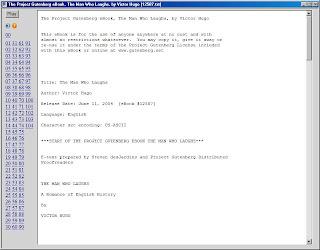
The Man Who Laughs as a TTS Application (for PC)
Link to the download of the EXE or ZIP file:
The_Man_Who_Laughs.exe
1) Download
2) Run~extract
3) Open "The_Man_Who_Laughs" folder
4) Open "12587_pg_etext.hta"
5) Select chapter and press "Play"

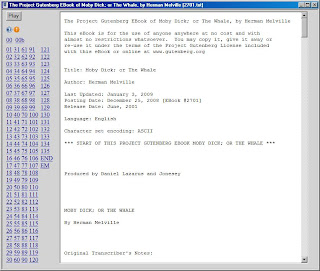
The Whale as a TTS Application (for PC)
Link to the download of the EXE or ZIP file:
The_Whale.exe
1) Download
2) Run~extract
3) Open "The_Whale" folder
4) Open "2701_pg_etext.hta"
5) Select chapter and press "Play"

2011-04-09
Anchors and Encoding
There are some down-loadable resources I'd rendered into a web page for my use -- found that the HTML anchor tag worked a little differently -- when you use a named tag -- it turns out it is better practice to use a link to a section id.
Likewise, when you use things like left and right double quotes you have to encode the page properly with the doc and head tags at beginning of document.
2010-05-02
ReadCal.hta
It creates an iCal ~ ICS format calendar events for
a book to be read. Enter "Item to be Read",
"Pages", "Readings" then press "OK".
A calendar in iCal format is generated in the
textarea and written to same file location as
the application.
Sample(A_City_of_Bells_SAMPLE.ICS):
http://www.box.net/shared/g9xvaxyklz
Download:
http://www.box.net/shared/u5su9lf8ss

ReadCal by Michael T. Bee is licensed under a Creative Commons Attribution 3.0 Unported License.
Based on a work at michael-t-bee-esi.blogspot.com.
Permissions beyond the scope of this license may be available at mailto:michael.t.bee@gmail.com.
Screenshots:


a book to be read. Enter "Item to be Read",
"Pages", "Readings" then press "OK".
A calendar in iCal format is generated in the
textarea and written to same file location as
the application.
Sample(A_City_of_Bells_SAMPLE.ICS):
http://www.box.net/shared/g9xvaxyklz
Download:
http://www.box.net/shared/u5su9lf8ss
ReadCal by Michael T. Bee is licensed under a Creative Commons Attribution 3.0 Unported License.
Based on a work at michael-t-bee-esi.blogspot.com.
Permissions beyond the scope of this license may be available at mailto:michael.t.bee@gmail.com.
Screenshots:


2010-03-18
Rely on God's Resources HTML Application
Plays the verses for "Rely on God's resources" packet from the TMS(Topical Memory System)
Download:
http://www.box.net/shared/gbskrpx2kl
SCREENSHOT:

Download:
http://www.box.net/shared/gbskrpx2kl
SCREENSHOT:
2010-02-20
The Empty House
This is an HTML Application wrapper of the BBC production of "The Empty House" at YouTube.
Download:
http://www.box.net/shared/6n2eypijh0
Download ~ extract ~ double-click TheEmptyHouse.hta in the MyItzyBits folder...
SCREENSHOT - Example extract:

SCREENSHOT - Example use:

Download:
http://www.box.net/shared/6n2eypijh0
Download ~ extract ~ double-click TheEmptyHouse.hta in the MyItzyBits folder...
SCREENSHOT - Example extract:

SCREENSHOT - Example use:

2010-02-14
Twenty Thousand Leagues Under the Sea
This is an HTA (HTML Application) that wraps the Project Gutenberg etext and plays it back using SAPI - TTS.
1) Download the self-extracting file to your desktop or "My Documents" folder
2) Run the file to extract the book
3) Double-click the file_pg_etext.hta file.
4) Click a chapter link and 'play' ~ 'stop'
Download:
http://www.box.net/shared/0a099i2ddj
See also: How to make a TTS Book, HTML Applications, Literature, Librivox Twenty Thousand Leagues Under the Sea
SCREENSHOT - Example of extraction and use...

1) Download the self-extracting file to your desktop or "My Documents" folder
2) Run the file to extract the book
3) Double-click the file_pg_etext.hta file.
4) Click a chapter link and 'play' ~ 'stop'
Download:
http://www.box.net/shared/0a099i2ddj
See also: How to make a TTS Book, HTML Applications, Literature, Librivox Twenty Thousand Leagues Under the Sea
SCREENSHOT - Example of extraction and use...

CI 20,000 Leagues Under the Sea
This is a wrapper for the Classics Illustrated comic #47 found at http://www.tkinter.smig.net/map.htm or http://www.tkinter.smig.net/ClassicsIllustrated/index.htm
Also, for audio renditions of the book check out the Librivox recording and my how to make a TTS book.
Download:
http://www.box.net/shared/74u4kjen78
SCREENSHOT:

Also, for audio renditions of the book check out the Librivox recording and my how to make a TTS book.
Download:
http://www.box.net/shared/74u4kjen78
SCREENSHOT:

The Song of Hiawatha by H.W.Longfellow
This is an HTA (HTML Application) that wraps the Project Gutenberg etext and plays it back using SAPI - TTS.
1) Download the self-extracting file to your desktop or "My Documents" folder
2) Run the file to extract the book
3) Double-click the file_pg_etext.hta file.
4) Click a chapter link and 'play' ~ 'stop'
Download:
http://www.box.net/shared/ryty2k9r3h
See also: How to make a TTS Book, HTML Applications, Literature
This is definitely a text that's best listened to
spoken vs TTS -- try:
Librivox recordings.
SCREENSHOT - Example of extraction and use...

SCREENSHOT - Regular Expressions & Roman Numerals...
Most Gutenberg texts have 'Chapter I' or 'CHAPTER I' type divisions.
This one did not. To use my TTS applet I had to prepend the 'Chapter'
text in front of the Roman Numeral text divisions. I thought it might
be helpful to others so I'm posting 'how-to' here as well. I used the
SemWare Editor to accomplish this.

1) Download the self-extracting file to your desktop or "My Documents" folder
2) Run the file to extract the book
3) Double-click the file_pg_etext.hta file.
4) Click a chapter link and 'play' ~ 'stop'
Download:
http://www.box.net/shared/ryty2k9r3h
See also: How to make a TTS Book, HTML Applications, Literature
This is definitely a text that's best listened to
spoken vs TTS -- try:
Librivox recordings.
SCREENSHOT - Example of extraction and use...

SCREENSHOT - Regular Expressions & Roman Numerals...
Most Gutenberg texts have 'Chapter I' or 'CHAPTER I' type divisions.
This one did not. To use my TTS applet I had to prepend the 'Chapter'
text in front of the Roman Numeral text divisions. I thought it might
be helpful to others so I'm posting 'how-to' here as well. I used the
SemWare Editor to accomplish this.

CI The Song of Hiawatha by H.W.Longfellow
This is a wrapper for the Classics Illustrated comic #057 found at http://www.kelvi.net/books/comics/ -- I'm trying to find who to contact to make request to deep-link to their site. If this post goes down -- probably means I didn't find ~ get permission.
Also, for audio renditions of the book check out the Librivox recording and my how to make a TTS book.
Download:
http://www.box.net/shared/ryty2k9r3h
SCREENSHOT:
Also, for audio renditions of the book check out the Librivox recording and my how to make a TTS book.
Download:
http://www.box.net/shared/ryty2k9r3h
SCREENSHOT:

2010-02-13
Journey to the Center of the Earth by Jules Verne
This is an HTA (HTML Application) that wraps the Project Gutenberg etext and plays it back using SAPI - TTS.
1) Download the self-extracting file to your desktop or "My Documents" folder
2) Run the file to extract the book
3) Double-click the file_pg_etext.hta file.
4) Click a chapter link and 'play' ~ 'stop'
Download:
http://www.box.net/shared/pa1z2dvhiu
See also: How to make a TTS Book, HTML Applications, Literature
SCREENSHOT - example extraction and use:

1) Download the self-extracting file to your desktop or "My Documents" folder
2) Run the file to extract the book
3) Double-click the file_pg_etext.hta file.
4) Click a chapter link and 'play' ~ 'stop'
Download:
http://www.box.net/shared/pa1z2dvhiu
See also: How to make a TTS Book, HTML Applications, Literature
SCREENSHOT - example extraction and use:

CI Journey to the Center of the Earth by Jules Verne
This is a wrapper for the Classics Illustrated comic #138 found at http://www.tkinter.smig.net/ClassicsIllustrated/index.htm.
Also, for audio renditions of the book check out the Librivox recording and my how to make a TTS book.
Download:
http://www.box.net/shared/mxvzs8o1zi
SCREENSHOT:

Also, for audio renditions of the book check out the Librivox recording and my how to make a TTS book.
Download:
http://www.box.net/shared/mxvzs8o1zi
SCREENSHOT:

Sense and Sensibility by Jane Austen
This is an HTA (HTML Application) that wraps the Project Gutenberg etext and plays it back using SAPI - TTS.
1) Download the self-extracting file to your desktop or "My Documents" folder
2) Run the file to extract the book
3) Double-click the file_pg_etext.hta file.
4) Click a chapter link and 'play' ~ 'stop'
Download:
http://www.box.net/shared/egejr9ktyj
See also: How to make a TTS Book, HTML Applications, Literature
SCREENSHOT - example extraction and use:
 This is an HTA (HTML Application) that wraps the Project Gutenberg etext and plays
1) Download the self-extracting file to your desktop or "My Documents" folder
2) Run the file to extract the book
3) Double-click the file_pg_etext.hta file.
4) Click a chapter link and 'play' ~ 'stop'
Download:
http://www.box.net/shared/egejr9ktyj
See also: How to make a TTS Book, HTML Applications, Literature
SCREENSHOT - example extraction and use:

Pride and Prejudice by Jane Austen
This is an HTA (HTML Application) that wraps the Project Gutenberg etext and plays it back using SAPI - TTS.
1) Download the self-extracting file to your desktop or "My Documents" folder
2) Run the file to extract the book
3) Double-click the file_pg_etext.hta file.
4) Click a chapter link and 'play' ~ 'stop'
Download:
http://www.box.net/shared/9ztlrz987c
See also: How to make a TTS Book, HTML Applications, Literature
SCREENSHOT - example extraction and use:

1) Download the self-extracting file to your desktop or "My Documents" folder
2) Run the file to extract the book
3) Double-click the file_pg_etext.hta file.
4) Click a chapter link and 'play' ~ 'stop'
Download:
http://www.box.net/shared/9ztlrz987c
See also: How to make a TTS Book, HTML Applications, Literature
SCREENSHOT - example extraction and use:

Persuasion by Jane Austen
This is an HTA (HTML Application) that wraps the Project Gutenberg etext and plays it back using SAPI - TTS.
1) Download the self-extracting file to your desktop or "My Documents" folder
2) Run the file to extract the book
3) Double-click the file_pg_etext.hta file.
4) Click a chapter link and 'play' ~ 'stop'
Download:
http://www.box.net/shared/01lkis2co3
See also: How to make a TTS Book, HTML Applications, Literature
SCREENSHOT - example extraction and use:

1) Download the self-extracting file to your desktop or "My Documents" folder
2) Run the file to extract the book
3) Double-click the file_pg_etext.hta file.
4) Click a chapter link and 'play' ~ 'stop'
Download:
http://www.box.net/shared/01lkis2co3
See also: How to make a TTS Book, HTML Applications, Literature
SCREENSHOT - example extraction and use:

Northanger Abbey by Jane Austen
This is an HTA (HTML Application) that wraps the Project Gutenberg etext and plays it back using SAPI - TTS.
1) Download the self-extracting file to your desktop or "My Documents" folder
2) Run the file to extract the book
3) Double-click the file_pg_etext.hta file.
4) Click a chapter link and 'play' ~ 'stop'
Download:
http://www.box.net/shared/m7c2ncimvi
See also: How to make a TTS Book, HTML Applications, Literature
SCREENSHOT - example extraction and use:

1) Download the self-extracting file to your desktop or "My Documents" folder
2) Run the file to extract the book
3) Double-click the file_pg_etext.hta file.
4) Click a chapter link and 'play' ~ 'stop'
Download:
http://www.box.net/shared/m7c2ncimvi
See also: How to make a TTS Book, HTML Applications, Literature
SCREENSHOT - example extraction and use:

2010-02-12
Around the World in 80 Days by Jules Verne
This is a wrapper for the Classics Illustrated comic #69 found at jv.gilead.org.il -- I think the files on that site may be incomplete -- I've found only 26 of what I suspect originally were 52 images.
Try a Google of "Around the World in 80 Days Scribd" -- I found the full version on that site. Also, for audio renditions of the book check out the Librivox recording.
Download:
http://www.box.net/shared/125s2a412u
See also: How to make a TTS Book, HTML Applications, Literature
SCREENSHOT:

Try a Google of "Around the World in 80 Days Scribd" -- I found the full version on that site. Also, for audio renditions of the book check out the Librivox recording.
Download:
http://www.box.net/shared/125s2a412u
See also: How to make a TTS Book, HTML Applications, Literature
SCREENSHOT:

2010-02-11
Mansfield Park by Jane Austen
This is an HTA (HTML Application) that wraps the Project Gutenberg etext and plays it back using SAPI - TTS.
1) Download the self-extracting file to your desktop or "My Documents" folder
2) Run the file to extract the book
3) Double-click the file_pg_etext.hta file.
4) Click a chapter link and 'play' ~ 'stop'
Download:
http://www.box.net/shared/p7sf0ec4zu
See also: How to make a TTS Book, HTML Applications, Literature
SCREENSHOT - Example of extraction and use...

1) Download the self-extracting file to your desktop or "My Documents" folder
2) Run the file to extract the book
3) Double-click the file_pg_etext.hta file.
4) Click a chapter link and 'play' ~ 'stop'
Download:
http://www.box.net/shared/p7sf0ec4zu
See also: How to make a TTS Book, HTML Applications, Literature
SCREENSHOT - Example of extraction and use...

Lady Susan by Jane Austen
This is an HTA (HTML Application) that wraps the Project Gutenberg etext and plays it back using SAPI - TTS.
1) Download the self-extracting file to your desktop or "My Documents" folder
2) Run the file to extract the book
3) Double-click the file_pg_etext.hta file.
4) Click a chapter link and 'play' ~ 'stop'
Download:
http://www.box.net/shared/3s1m73aevc
See also: How to make a TTS Book, HTML Applications, Literature
SCREENSHOT - Example extraction and use...

1) Download the self-extracting file to your desktop or "My Documents" folder
2) Run the file to extract the book
3) Double-click the file_pg_etext.hta file.
4) Click a chapter link and 'play' ~ 'stop'
Download:
http://www.box.net/shared/3s1m73aevc
See also: How to make a TTS Book, HTML Applications, Literature
SCREENSHOT - Example extraction and use...

Subscribe to:
Posts (Atom)
